Your AI agents
make a mess.
Clean it up.

They write the code. They leave the clutter.
Meet the Mac app that helps you clear the leftovers
and keep the work that matters.

v0.2.1 · macOS 14+ · Apple silicon & Intel

Early release. Developer ID signed; notarization pending.

The sidekick your
coding sidekicks need.

Go on. Boop the bin.
CleanMyAgent Interactive preview
Explore the app. Make yourself at home.

Worktrees

The task is done. Check what can go.

Audited5
Safe to remove2
Verified space11 GB
Protected3
Select a safe worktree to try it.

Try the cleanup?

    This is a simulation. Nothing on your Mac is changed.

    For the agents you already use.

    Storage adapters for all eight. Usage, process and speed coverage varies by agent and version.

    “Task completed.”
    Disk still full.

    The agent moved on. That extra checkout didn’t. Neither did its node_modules, downloaded test browsers, or pile of cached packages.

    CleanMyAgent connects the clutter to its owner, checks what needs to stay, and gives you a clear choice. No spelunking through mystery folders.

    Take a look around

    Less mystery.
    More room.

    Find the space hogs. Review the leftovers.
    Keep an eye on what your agents are doing.

    The task is done.
    The checkout isn’t.

    Find forgotten Git worktrees. See their branch, size and PR state, then review what can go.

    Verified worktrees are removed through Git after a fresh check and your confirmation. Branches and PRs remain.

    Explore Worktrees

    Keep the code.
    And the secrets.

    Changed or untracked files. Local-only commits. Unique ignored .env or key files. They stay protected.

    Checks include locks, active processes and open PRs. Missing evidence or one warning is enough to keep a worktree. Everything is checked again before cleanup.

    How your work stays safe
    node_modules

    Big folder.
    Small goodbye.

    Gitignored dependencies in inactive extra worktrees can go to Trash. Your source and Git history stay put.

    Try the cleanup preview

    Caches have
    a checkout time.

    • npm
    • Yarn
    • Playwright
    • Puppeteer
    • Codex

    Review specific, allowlisted caches. Active or unverifiable folders stay protected. Codex caches stay put while Codex is running.

    Old sessions.
    Out of the way.

    Move archived Codex sessions to Trash while Codex is closed. Active sessions stay out of the selection.

    Generated images and repositories are never selected.

    “Just one more prompt.”
    How many was that?

    Daily activity, models and sessions. Input, output, cached and reasoning tokens. See your local usage over 7, 30 or 90 days.

    Costs appear only when the provider records them. Partial coverage is labelled; Ori launcher tokens aren’t counted twice.

    Every gigabyte
    has an address.

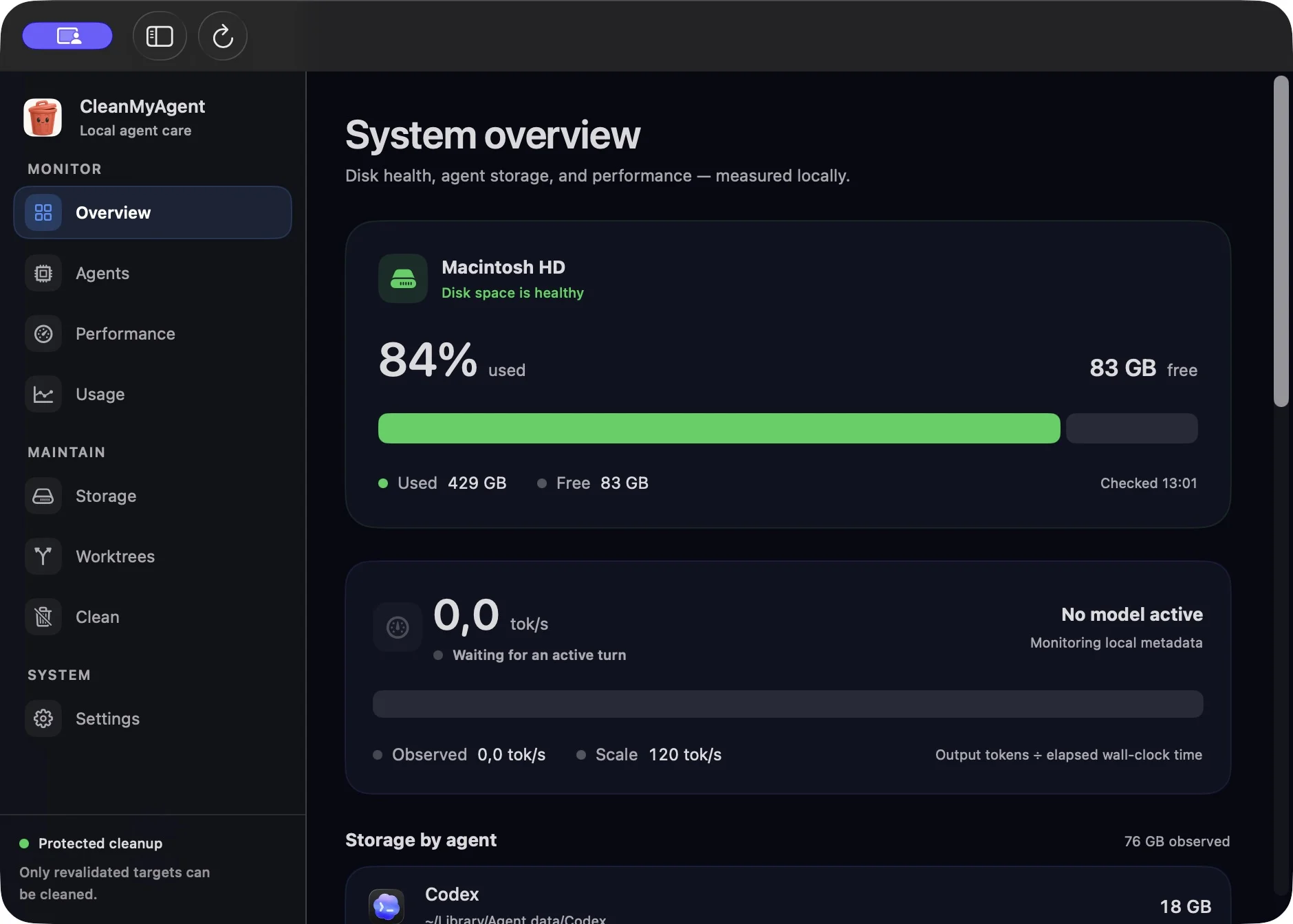
    Disk capacity and free space, with storage grouped by agent, category and local folder. Follow the path behind the number.

    Storage adapters for all eight supported agents.

    Explore Overview

    Know the pace.
    See the footprint.

    Observed output speed, time to first token and response duration. Attributable process RAM and process counts, where local evidence supports them.

    Live Codex throughput. Explicit coverage notes for other agents. Local observations, never a promise to make your Mac faster.

    Explore Performance

    A little Mac utility.
    Right where you need it.

    A menu-bar summary. Your development folder in Settings. A manual refresh or a quick ⌘R.

    Local scans. No account or telemetry. GitHub PR checks use your existing gh login.

    Your data stays yours
    See the real appFive native views

    Swipe the tabs to explore all five views.

    CleanMyAgent Overview with disk space, storage by agent and live activity. Example data.
    Actual app · example data

    Finally, a name
    for that big folder.

    See your free disk space, storage by agent and the paths behind the numbers. Find out which tool is taking up room before touching a file.

    • Disk capacity, free space and agent storage
    • Storage categories with local folder paths
    • Process counts and attributable RAM
    • Menu-bar summary and ⌘R refresh

    Your work
    gets the final say.

    Big doesn’t mean disposable. One warning outweighs every reason to clean.

    CleanMyAgent checks the evidence again right before acting. If something changed, or a check can’t be verified, the target stays protected.

    Read the safety rules
    Uncommitted or untracked work
    Keep
    Commits not verified on a remote
    Keep
    Unique ignored .env or key files
    Keep
    Active, locked or open-PR worktrees
    Keep
    Missing or uncertain evidence
    Keep
    Clean, inactive, verified merged HEAD
    Review

    You review the preview and confirm the action. Nothing is cleaned automatically.

    Two kinds of cleanup. Clearly explained.

    Caches, dependencies and archives go to macOS Trash and remain recoverable until you empty it. Worktrees are removed directly by Git after confirmation; their branches and PRs remain. Space in Trash is reclaimed when you empty it yourself.

    Your mess.
    Your Mac.
    Your business.

    Runs locally, without an account or telemetry.

    Scans stay on your Mac. The app reads local storage, Git state and structured usage metadata without indexing your conversations.

    GitHub pull-request verification uses your existing local gh login. That’s the app’s limited network use.

    The source is right here

    A few things
    before you clean.

    How do I install it?

    Download the ZIP, unzip it, and drag CleanMyAgent.app into Applications. It’s a bundled native app: no Xcode, Swift or Node setup.

    This early release is Developer ID signed and not yet notarized by Apple. macOS may ask you to approve it in System Settings → Privacy & Security. Review the source and release notes before approving an app you download.

    Requires macOS 14 Sonoma or later. The universal bundle runs on Apple silicon and Intel Macs.

    Is it really free?

    Yes. Free to download, with MIT-licensed source code. No subscription or account required.

    Do I need the GitHub CLI?

    Only for GitHub pull-request verification. Install gh and run gh auth login if you want those checks. Without verified PR evidence, affected worktrees stay protected; the other views remain useful.

    Will it delete my code or my .env?

    Worktrees with changed or untracked files, local-only commits, or unique ignored content stay protected. Ignored directories require review too. The app rechecks every selected target before cleanup. Always read the preview: Git worktree removal is a direct removal, while cache and archive cleanup uses Trash.

    Does it clean my whole Mac?

    It focuses on coding-agent storage, linked worktrees, specific dependencies, allowlisted developer caches and archived Codex sessions. It isn’t an antivirus or a general system cleaner, and it doesn’t promise to make your Mac faster.

    Are usage and costs complete?

    No. They come from structured local records, and coverage varies by agent and version. Costs are shown only when a provider records them. Observed speed includes the timing visible locally; it is not a provider benchmark.

    Keep the code.
    Lose the clutter.

    Your agents had their turn. Give your disk a break.

    Download CleanMyAgent for Mac

    Free · v0.2.1 · macOS 14+ · Apple silicon & Intel

    Developer ID signed · Notarization pending · Installation details